Controls: what the developer actually confirms
The official description mentions throttle, front braking, wheel lift and crashes on a circuit. It does not document a complete control map, a gear-shift timing window or recommended tuning settings.
Find the relevant controls in your own installed version. The suggestions below explain how to structure practice; they are not first-hand tests of version 5.3 and do not promise a winning technique.
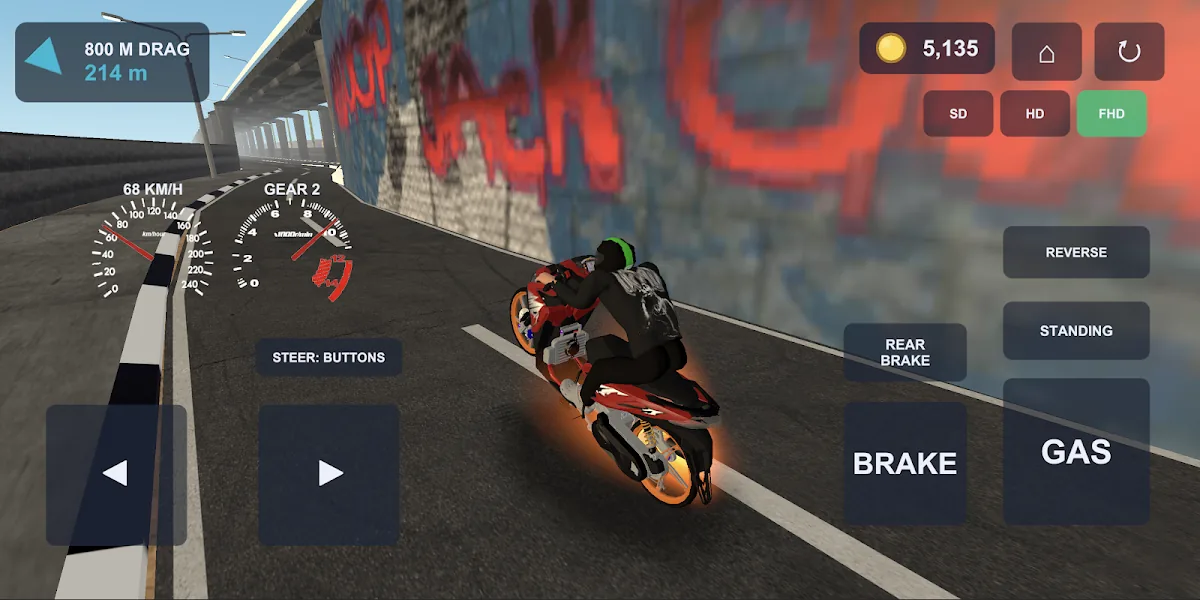
Read the controls in an official screenshot
In the official 800 m screenshot below, the left side shows two steering arrows. The right side shows buttons labelled GAS, BRAKE and REAR BRAKE. SD, HD and FHD graphics choices are visible at the top. These labels are directly observable in this store image; we have not tested the buttons on an installed build.
Use the arrows as your reference for steering and the labelled controls to find throttle and braking in that capture. REVERSE and STANDING are also shown, but we do not infer their exact behaviour from a still image. The speed, gear and coin values are just the state in the screenshot, not recommended targets.
Starts: watch for front-wheel lift
Official mechanism: applying too much throttle off the line can lift the front wheel. The store does not supply an ideal throttle percentage, RPM target or exact launch timing.
Practice suggestion: keep the same bike and use the 201 m mode to focus on a controllable launch. If the front lifts, try a less aggressive input on the next run, as your controls allow. Look for a repeatable clean start before trying to reduce your time.
Braking: learn the consequence before adding speed
Official mechanism: excessive front brake can tip the bike over the front. This confirms a risk, not a claim that one brake setting is optimal.
Practice suggestion: familiarize yourself with braking at a speed you can manage. If you keep pitching forward, reduce how abruptly you use the front brake and observe the next attempt. We do not have verified rear-brake, ABS or brake-balance settings to recommend.
Road Race: repeat a line through the corner
The developer describes Road Race as a circuit where lines and braking points matter, and says a missed line can lead to a crash. An 800 m sprint and a circuit therefore call for different practice goals.
Practice suggestion: pick a visible trackside landmark, approach the same corner consistently and change one part of your approach at a time. Record whether you finish the corner cleanly. No track-specific braking marker has been tested for this guide.
A simple way to compare your attempts
- Keep the same bike, graphics tier and mode for the comparison.
- Choose one problem: front-wheel lift, a braking crash or a missed corner.
- Change one input habit and repeat the run.
- Compare clean finishes first; compare times only when the result screen provides them.
- Treat a single faster run as an observation, not proof that a cosmetic part improved performance.
Sources & verification
- Sources checked
- Page edited
Game guides use the official listing observed at version 5.3. No hands-on test of this build is claimed; practice suggestions are editorial advice.